Guests
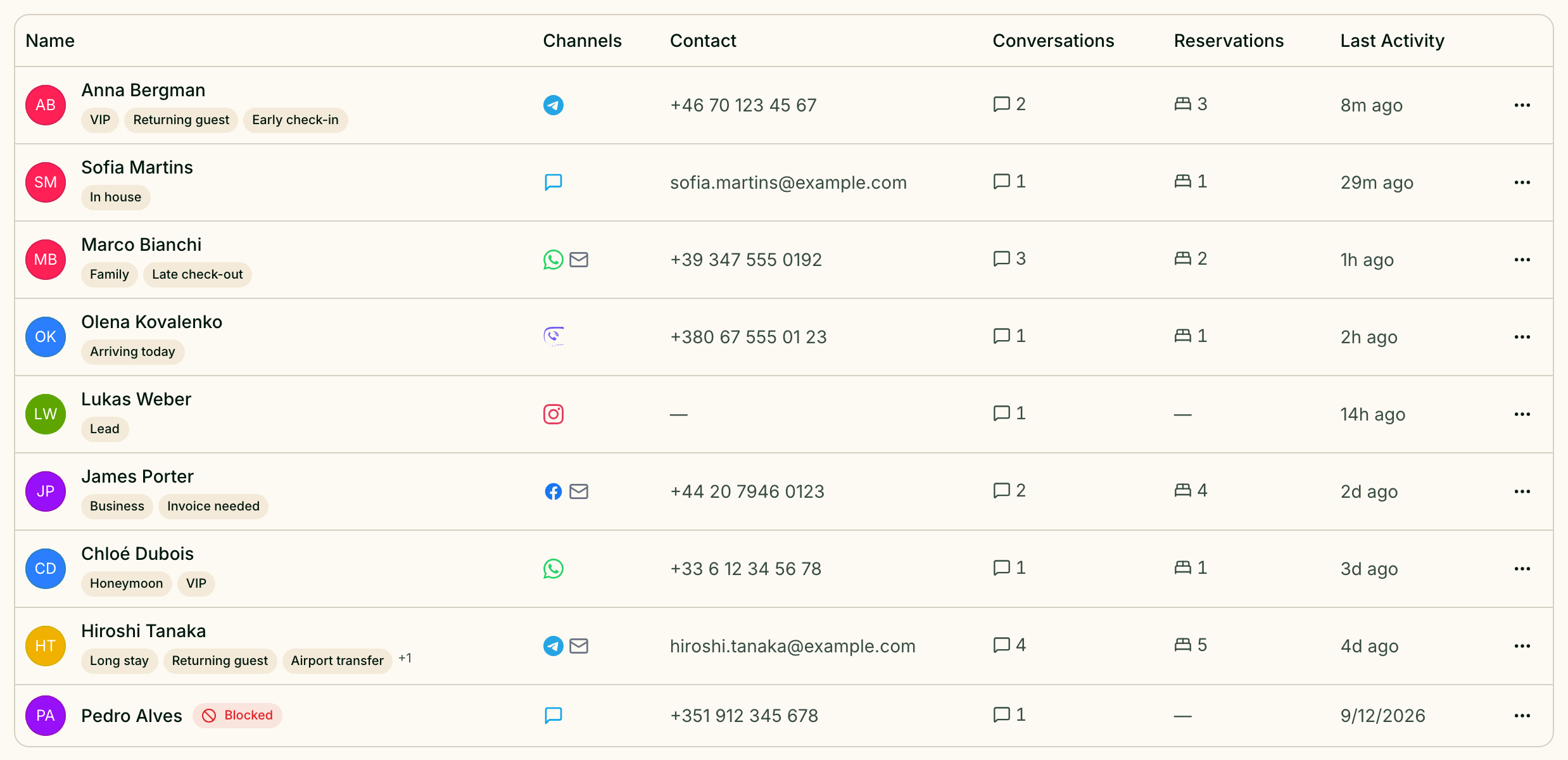
Everyone who writes to you gets a guest profile on their own — the first message through any channel creates it. The Guests screen is the list of those profiles: who they are, how they reach you, how many conversations and bookings they have. Open it from Manage → Guests, or at /guests.
Clicking a row opens the full profile.
Find a guest
The search box — Search by name, phone, email, or tag... — looks at the name, phone number, email and the guest's tags. Part of a tag is enough.
The filters under it narrow the list:
| Filter | Options |
|---|---|
| Channel | All Channels, Telegram, Viber, WhatsApp, Facebook, Instagram |
| Status | All statuses, Active, Blocked |
| Reservations | Any reservations, With reservations, No reservations |
| Tags | All tags or one tag from your list |
| Sort by | Recently updated, Oldest added, Newest added, Name (A–Z) |
Clear filters puts everything back. The search box and filters appear once there is at least one guest in the list.
Read the list
| Column | What it shows |
|---|---|
| Name | The guest's name, a Blocked badge if they are blocked, and up to three tags |
| Channels | An icon for each messenger the guest has written from |
| Contact | Phone number, or email if there is no phone |
| Conversations | How many conversations the guest has had with you |
| Reservations | How many bookings are linked to the guest; click the number to see them all |
| Last Activity | When the guest last did something |
At the bottom, Per page switches between 25, 50 and 100 rows.
Add a guest by hand
Most profiles appear on their own, but a guest who phoned or walked in can be added with Add Guest. Only Display Name is required; Phone, Email and Guest tags are optional.
Merge duplicates
A guest who writes from Telegram and later from WhatsApp ends up with two profiles — Greetio does not join them automatically. To join them, open the row menu on the profile you want to keep and choose Merge. In the Merge guests window, find the duplicate by name, phone or email and pick it: the window shows which profile Will be merged and which one Stays. Its channels, conversations and reservations move to the profile that stays.
A merge can be undone. The profile that stayed lists the joined ones under Merged profiles, each with an Unmerge button.
Block a guest
Block Guest in the row menu marks a guest as blocked, with an optional reason. A blocked guest can still write to you — you simply see the Blocked badge next to their name — but mailings skip them. Unblock Guest lifts it.
Delete a profile
Delete removes the profile for good. The guest's messenger accounts stay in Greetio, they are just no longer tied to this profile. If the goal is to tidy up a duplicate, merge it instead: a merge can be undone, a deletion cannot.
Who can change guests
Owners, managers and administrators can add, edit, merge, block and delete guests. A viewer sees the list and the profiles but none of the editing buttons.
Current limits
- No automatic merging. Profiles from different channels are joined only by hand.
- The channel filter covers five messengers — Telegram, Viber, WhatsApp, Facebook and Instagram. Guests who only wrote through the website chat, Threads or TikTok are found by search, not by that filter.
- No bulk actions or export. Guests are merged, blocked and deleted one at a time, and the list cannot be downloaded.